Obiee Errors

§  304 errors in the HTTP cycle

Any client (e.g. your Web browser or our CheckUpDown robot) goes through the following cycle when it communicates with the Web server:

  • Obtain an IP address from the IP name of the site (the site URL without the leading ‘http://’). This lookup (conversion of IP name to IP address) is provided by domain name servers (DNSs).
  • Open an IP socket connection to that IP address.
  • Write an HTTP data stream through that socket.
  • Receive an HTTP data stream back from the Web server in response. This data stream contains status codes whose values are determined by the HTTP protocol. Parse this data stream for status codes and other useful information.

This error occurs in the final step above when the client receives an HTTP status code that it recognises as ‘304’.

§  Fixing HTTP 304 errors – General

You should never see this error in your Web browser. It should simply present the Web page from its cache – because it believes the page has not changed since it was last cached. If your client is not a Web browser, then it should equally be able to present the page from a cache. If unable to do so, it is not using the If_Modified_Since or related headers correctly.

§  Fixing HTTP 304 errors

You should never see this error at all for the CheckUpDown service. It indicates defective programming by us or the developers of the Web server software. Either we or they are not respecting HTTP protocols completely.

The 304 status code should only be returned if we allow it in the HTTP data stream we send to the Web server. Because we keep no records of the actual content of your URL Web page, we specifically disallow the 304 response in the HTTP data stream we send.

So if the Web server implements the HTTP protocol properly, it should never send an 304 status code back to us. This response is not what we expect, so we actively report it as an error even though it does not necessarily mean that the Web site is down.

Please contact us directly (email preferred) whenever you encounter 304 errors. Only we can resolve them for you. Unfortunately this may take some time, because we have to analyse the underlying HTTP data streams and may have to liaise with your ISP and the vendor of the Web server software to agree the exact source of the error.

++++++++++++++++

So enough fade up with HTTP 304… lets see how Oracle proposed to resolve the problem using “HTTP compression and caching” technique.

Why use Web Server Compression / Caching for OBIEE?

o       Bandwidth Savings: Enabling HTTP compression can have a dramatic improvement on the latency of responses. By compressing static files and dynamic application responses, it will significantly reduce the remote (high latency) user response time.

o       Improves request/response latency: Caching makes it possible to suppress the payload of the HTTP reply using the 304 status code.  Minimizing round trips over the Web to re-validate cached items can make a huge difference in browser page load times.

This screen shot depicts the flow and where the compression and decompression occurs.

The Solution:

1.      To implement HTTP compression / caching, install and configure Oracle HTTP Server (OHS) 11.1.1.x for the bi_serverN Managed Servers (refer to “OBIEE Enterprise Deployment Guide for Oracle Business Intelligence” document for details).

2.      On the OHS machine, open the file HTTP Server configuration file (httpd.conf) for editing.

This file is located in the OHS installation directory.
For example: ORACLE_HOME/Oracle_WT1/instances/instance1/config/OHS/ohs1

3.      In httpd.conf file, verify that the following directives are included and not commented out:

LoadModule expires_module “${ORACLE_HOME}/ohs/modules/mod_expires.so

LoadModule deflate_module “${ORACLE_HOME}/ohs/modules/mod_deflate.so

4.      Add the following lines in httpd.conf file below the directive LoadModule section and restart the OHS:

Note: For the Windows platform, you will need to enclose any paths in double quotes (“)

For example:

Alias /analytics “/ORACLE_HOME/bifoundation/web/app”

<Directory “/ORACLE_HOME/bifoundation/web/app”>

Alias /analytics ORACLE_HOME/bifoundation/web/app

#Pls replace the ORACLE_HOME with your actual BI ORACLE_HOME path
bifoundation/web/app>
#We don’t generate proper cross server ETags so disable them
FileETag none
SetOutputFilter DEFLATE
# Don’t compress images
SetEnvIfNoCase Request_URI \.(?:gif|jpe?g|png)$ no-gzip dont-vary
<FilesMatch “\.(gif|jpeg|png|js|x-javascript|javascript|css)$”>
#Enable future expiry of static files
ExpiresActive on
ExpiresDefault “access plus 1 week”
#1 week, this will stops the HTTP304 calls i.e. generated by IE 8
Header set Cache-Control “max-age=604800”
</FilesMatch>
DirectoryIndex default.jsp
</Directory>

#Restrict access to WEB-INF
<Location /analytics/WEB-INF>
Order Allow,Deny
Deny from all
</Location>

OBIEE Issue

♦ Issue #1


While  added a filter on Top 20 TRx measure value and then edit the same measure value from the report filter as below:
IFNULL(NNI Weekly.Curr Week TRx,0)  is in top  20
Changed the expression and after removing IFNULL I can see “Is in Top” option vanishes. So you can’t choose numbers anymore that in which ranges it belongs to.

♦ Issue #2

While restarting BI Components (Presentation Server, BI Server and Scheduler) from OFMW enterprise manager console it suddenly throws errors at the end of restart process. However the log and other information are not meaningful but the entire things were up and running behind the scene. Not really sure about what is the meaning of the error.
But it seems there is a communication delay between BI Server components and the Windows Process manager OPMN and once that delay is over all the components work perfectly in sync. Until OPMN also up and sync with BI components you will get error “Error 500–Internal Server Error” in bieehome page URL.

♦ Issue #3

Alternate inner coloring in pivot table row format actually overrides the measure column format label color specifications format once that measure bring from column section to row section.

♦ Issue #4

While you edit the page all the hidden page also visible and can also be edited like changing the entire page layout components. I think this is intentional and not an issue rather it gives the flexibility of altering the components even if those are hidden in actual dashboard page.

♦ Issue #5

The dashboard page level slider prompt control took unnecessary vertical whitespace from the end of the prompts till the Apply/Reset button causing the much more vertical section space for prompt. So even if, inside the control it is specified that the Button will be placed to the side of the prompt it doesn’t behave like that. So I think this is a bug to fix.

♦ Issue #6

Editing the compound layout from the dashboard page layout where it is specified to expose the view for say “Compound layout 3” rather default compound layout it should open the Layout 3 in the edit page. But it is not the case currently and always opens the default compound layout. I know, even the components specific editing feature was not there in 10g as well. But as a developer we could expect much more on that which helps our life cool.

♦ Issue #7

I encountered intermittently “Bad XML instance” while adding multiple prompt values in report filters and it doesn’t allow saving that report. Don’t know the reason about it but once I log off and log back in again everything is fine and I can even add those prompt criteria’s without issue.

♦ Issue #8

OFMW Enterprise Manager console weblogic  user is not case-sensitive and due to that reason when you enter using the user ‘WEBLOGIC’ say (all in caps though actual user is ‘weblogic’) you can logged in see all the pages and options and it allow to lock and edit the configuration button press. But once you click that you will see all the fields are still not editable and there will be no button called ‘ Release Configuration’ or ‘Activate Changes’ .So either it should allow all the functionalities or not allow to log into EM console at all .

♦ Issue #9

Changing the prompt text/label color and style will change the default section value of the prompt format as well. For e.g. if we change the prompt text color it will change the default value set in the prompt as well.

♦ Issue #10

Pivot table exclude is possible but not include in the non-designer mode. For e.g. once your report is ready and placed into the dashboard, right-click on some column and click to exclude some column from the pivot table display. You can do it. But you can’t get those excluded column back from the same section. Instead of that you have to click on reset page display or ‘Clear My Customization’ to get those column back into the pivot reports.

♦ Issue #11

Add to briefing book option is not displayed even if it is enabled in the dashboard layout against the displayed components. The problem happens when, instead of displaying the default compound layout or other compound layouts you are displaying the view like ‘View Selector’ etc.

♦ Issue #12

OBIEE 11g User Interface (UI) Performance Is Extremely Slow with Internet Explorer 8 (- IE version 8 – ) .Follow my previous post to get the details. Due to the browser problem several issues like below you can find while developing your reports.

♦ Changing the colors of the measure attribute behaves erratically and it doesn’t reflect on time in inline view and once the reports have been saved it is back on color.

♦ Sometime compound layout views displayed only without any control activated and hence browser needs to be closed after log-off and only solution to log back in.

♦ Issue can be appeared in Style Formatting for Graph. The spikes and the pointers (triangle, round) doesn’t display correctly.

♦ Issue #13

Saving the online 11g BI repository after modification of several components inside it ,the consistency checker failed throwing a weird kind of error message below:
[nQSError: 37005] Transaction update failed.
That is documented under Bug 9884975 (11G ADMIN TOOL RECEIVES NQSERROR: 37005 WHEN SAVING ONLINE RPD CHANGES 11.1.1.5.0  – version  Microsoft Windows (32-bit) )
And the resolution Patch 12909840 – GETTING ERROR: [46036] INTERNAL ASSERTION: CONDITION M_LOCK.ISACQUIRED() available on request from Oracle.

♦ Issue #14

11g RPD has thrown the error message while query on object from Physical layer and double-click that object to get the details.BI admin tool has thrown error “Object is orphaned and should be deleted”. The cause is unknown however I search the object and find it using pair of eyes and double clicking it is fine ! So weird no?

♦ Issue #15

I have encountered a strange error appeared while playing with OBIEE 11g repository. The error message as below:
“nQSError: 43113” – Message returned from OBIS
“nQSError: 46036” – Internal Assertion: Condition COLOCK_ISSET (value) , file server \objectmodel\Src\SORpObject.cpp , line 3
I have not found any such error logged in Oracle Support and not sure about the reason. However the problem resolved after closing the Admin tool without saving the changes and re-opening it!

♦ Issue #16

Graph slider (11g new feature) causes some unpredictable issues if you like to play with it more and more!(changing the sort order , randomly moved the column across several places in layout view , changing the measure data/column format). I had  faced some unpredictable issues and in place of Graph slider it displayed like an error with message and my slider control vanishes. However I got it back after 2-3 days after several restart. Might be a kind of rendering issue in IE8 is responsible for that. Now I switched to Firefox hence not having any problem until now.

♦ Issue #17

While adding the Groups (11g new features) inside catalog level, the values doesn’t change automatically until and unless Cancel button has been pressed. Once u click on Cancel button hold your mouse button and come to other section and release the button pressed you can see the value changed.

Fixing the BAD XML Instance Issue – OBIEE 11g

“The current xml is invalid with the following errors: Bad xml instance!” is very unusual error but when this has been encountered it is become frustrating as it sounds the entire report can’t be saved !

I remember last time I had faced the similar issue in 11.1.1.3 version while I was building a new report from scratch . The error enforced me not to even edit the reports so I neither I can move to criteria nor I can save this . That was weird !  The only option left was to edit the XML using Catalog manager but until and unless you know where the problem lies you can’t fix it right ?

Now recently I got similar kind of issue in one of our upgraded 11.1.1.6 report which is a Combined request report and when I tried to edit the Criteria Analysis properties Interaction tab to remove Sort column of un-check any other options it throws me below error during the save:

Okay … so the error was at the very last line of the displayed XML as below:

Line:814, Col:61, Element ‘criteria’ is not valid for content model: ‘((criteria,interactionOptions,views,prompts,listOptions),segmentOptions)’

so the bug is around the green circled tags !! Reason is whenever you un-check some options under “Analysis-Properties” it will throw errors !! Probably this is some problem with the up-graded code in 11g from 10g as I tried to replicate the same creating a new reports from scratch which was pretty cool and removing any interaction works perfectly okay in the dashboard report .

After spending some times the reason of the issue found with the fix . I have customized the location for the below tag from Advanced XML :

<saw:interactionOptions drill=”true” movecolumns=”true” sortcolumns=”false” addremovevalues=”true” groupoperations=”true” calcitemoperations=”true” showhidesubtotal=”true” showhiderunningsum=”true” inclexclcolumns=”true”/>

Edited the XML and moved it from beforesection to the end of all. As it is combined request hence several would be present but placed it after all of them.

After that apply the changes in Advanced XML and voila …. your problem fixed !  Note that this could be the one of incident with BAD XML error and probably you can found it in several other places with no relation to my above fix note . This those cases you need to dig down into more details of the Advanced XML generated and fix those issues as applicable for your case .

Bottom line is same . Dig into the XML details to find out the crappy code and the fix it ! …

So that’s it …. till next time… Happy weekend

OBIEE 11g upgrade has a lot of issues

OBIEE 11g upgrade has a lot of issues and among couple of them common is on Conditional Formatting . This emphasis that even if the Catalog upgrade is successful there are some of the problem still persists in XML conversion engine of the Upgrade Assistant(UA) leading though several catalog defects due to malformed XML . This is another example as my upgraded 11g charts failing to show its conditional formatting which is was working perfectly in 10g ….

Lets deep dive on whats the issue …

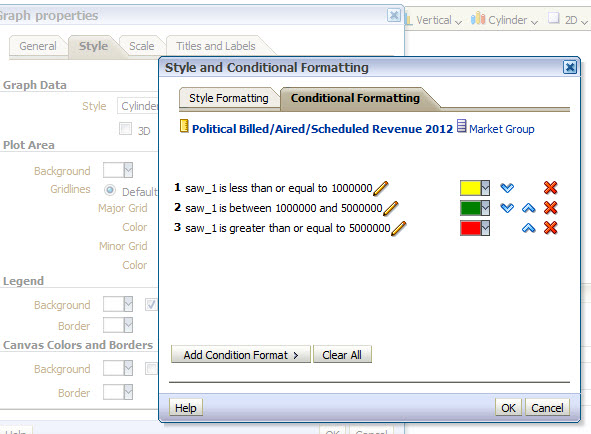
Below is the conditional format definition in 11g which is aligned with 10g:

So ideally it should show Chart bars (which is generated from Combined request Pivoted Graph) and see the below comparison:

To understand the reason of why 11g chart not showing the conditional format I went through the full XML from Advanced tab of 11g and find the below discrepancies:

This is malformed XML generated by UA during the upgrade of 10g code .If we look into 10g Advanced XML this is actually decimal but for some reason UA failed to put correct literal against it .

So the fix is replace all the instances of string “untypedLiteral” with “decimal’ like below:

Now after applying the XML the 11g chart output like :

And voila …. the problem is fixed … There could be another workaround to copy your 10g entire XML to 11g and yes it should work